
UK veterinary practices covered by Article 7 of the CMA Order must publish prices for the Schedule 1 services they offer and make the list available in practice. The initial digital consultation confirmation must also include the consultation price and a link to the list. Read the CMA’s price-list guidance.
PetsApp’s free veterinary price-list tool helps your team manage Schedule 1 items, shared group prices and clinic-specific differences. This guide explains how to build a review process around your published prices.
Is PetsApp’s veterinary price list free?
Yes. PetsApp’s price list is available now, free and self-service. Your team can manage prices in the dashboard and publish a public list for owners. PMS-linked prices are supported for Merlin, Provet, ezVetPro and Teleos; prices can also be entered manually.
Already use PetsApp? Open pricing settings to get started.
What does the public price list look like?
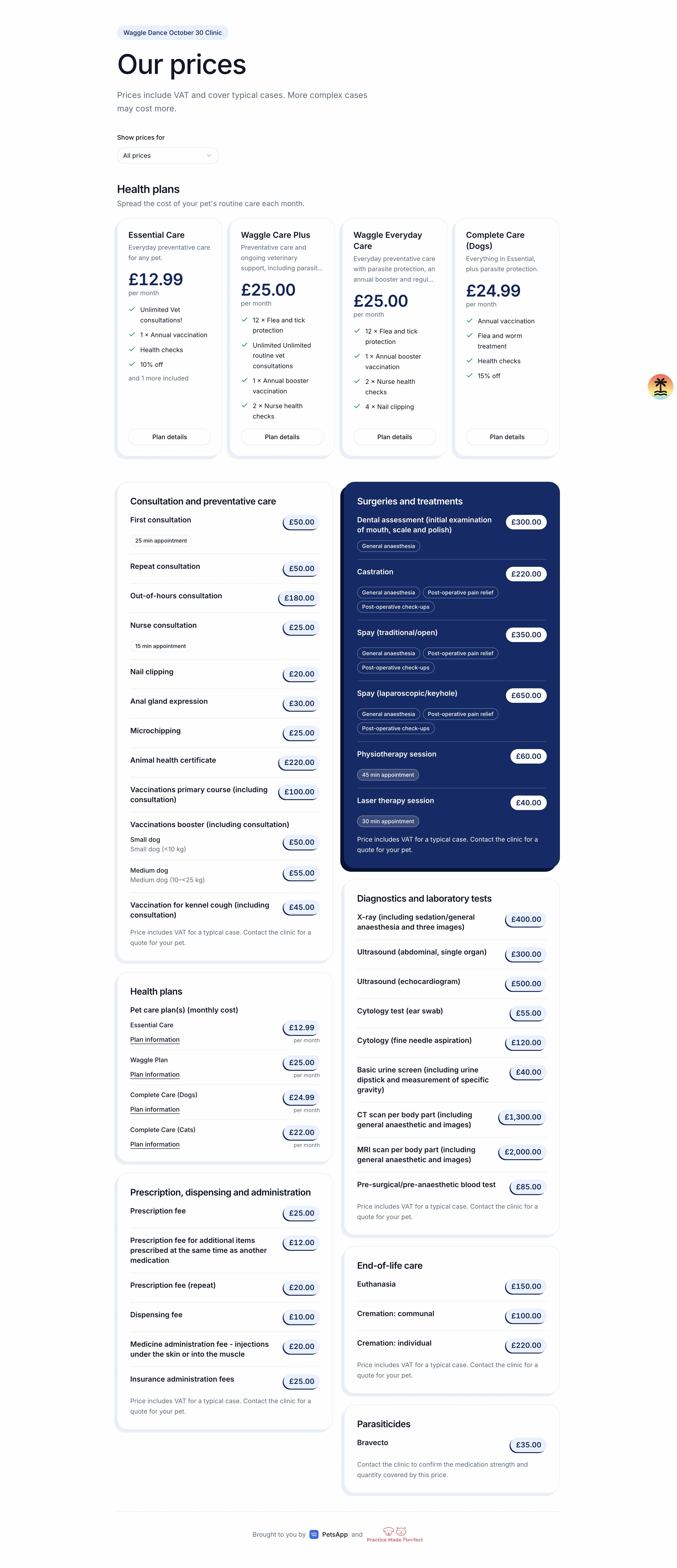
The example below brings health plans, consultations, surgery, diagnostics, prescription fees and other service categories onto one public page. It shows consultation durations and different vaccination prices for small and medium dogs. The figures are from this example clinic setup, rather than recommended fees.
See the full example public price list
Start with the current CMA requirements
For the wider picture, read our overview of CMA compliance for UK vets.
The CMA published its Veterinary Services Market Investigation Order in September 2026. It applies across the UK, with phased compliance dates. Check Article 3 for the dates and business definitions that apply to your practice. Read the Order and supporting documents.
Schedule 1 sets out 36 standard items across consultations and preventative care, prescription and administration fees, surgery, diagnostics and end-of-life care. The CMA’s indicative list also shows appointment durations, treatment inclusions and third-party provider details where relevant. Use it to check the information for the services you offer. See the CMA’s indicative price list.
Give somebody ownership of the list
Before choosing a format, decide who maintains it. A price change can involve a practice manager, a PMS administrator and the person who updates your website. If each assumes somebody else has finished the job, old information can stay visible.
Make the handover explicit: who approves a new fee, who checks the public list and who checks the wording your team sends to owners? Give that person a short checklist to use whenever fees change.
Run an initial review with reception too. They will know which questions owners ask most often and where a service name needs explaining in conversation.
Use the right price for the right clinic
For a group, a single central list can be a helpful starting point. It becomes confusing when a branch charges a different fee and the owner has no way to tell which price applies.
PetsApp’s price-list tools support group defaults and clinic-specific overrides. Your team can manage shared prices centrally and set differences for individual clinics. The catalogue starts with the 36 Schedule 1 items and also supports custom items.
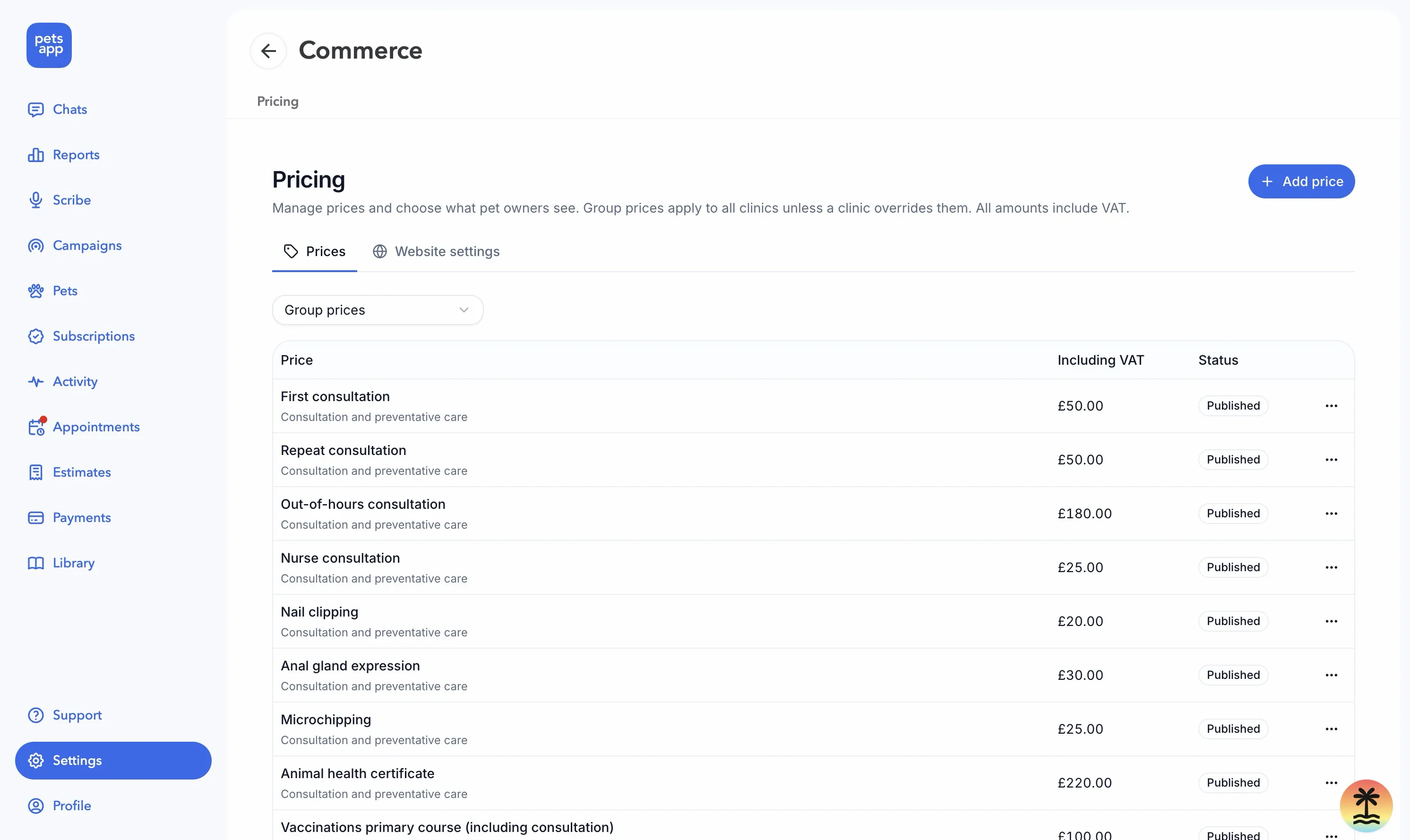
In Commerce → Pricing, staff can manage group prices, choose what owners see and check whether each item is published. A clinic can override a group price.
When reviewing a branch, open its public list as an owner would. Check a first consultation, a repeat consultation and a service with species or weight variations. Ask reception to compare those examples with the prices they would give over the phone.
Reduce repeated price entry
Typing the same fee into several places makes updates harder to manage. PetsApp supports manually entered prices and prices linked to catalogue items from Merlin, Provet, ezVetPro and Teleos, or to wellness plans. Linked sources are resolved when the list is requested, helping reduce repeated entry.
Check your PMS connection and clinic mapping during setup. A linked source still needs to represent the service you intend to publish; a product name alone does not establish that the price includes everything your team normally supplies.
For a treatment with several components, review the complete price alongside a recent typical case. This is a useful way to catch a fee that looks plausible but omits part of the service.
Check the page on a phone
An owner may be reading your prices on a small screen while worrying about their pet. Open the list on a phone, choose the relevant clinic and check that the text is readable. Ask somebody outside the setup team to find a consultation price without prompting.
PetsApp’s public price list supports practice colours and fonts. Use those choices to make the list feel familiar while keeping the figures and service names easy to read.
Connect the list to the rest of the client journey
A useful next step is to review booking confirmations and appointment reminders. Owners should receive consistent information whether they start on your website, book online or speak to reception.
If you offer health plans, review how you explain plan costs and benefits alongside your standalone prices.
Explore PetsApp’s free price list or book a demo to discuss your clinic’s setup.
Reviewed against CMA publications on 9 November 2026. This article covers price-list workflows; check the full Order for your practice’s obligations.


